

The Platform
Two pieces, one workflow
Section titled “Two pieces, one workflow”Everything in MooveTeam revolves around two components:
-
MooveTeam CMS — the back-office. A website where you design events, manage teams, and monitor live gameplay. You open it in your browser and log in with your credentials.
-
MooveXR — the player app. A phone or tablet app (iOS and Android) that shows the map, displays challenges, tracks GPS, and supports augmented reality. Players install it before the event or scan a QR code you provide. Search for MooveXR on the App Store or Google Play.
You design the experience in MooveTeam CMS, then participants play it on MooveXR.
How an event flows
Section titled “How an event flows”This is the complete lifecycle, from your perspective:
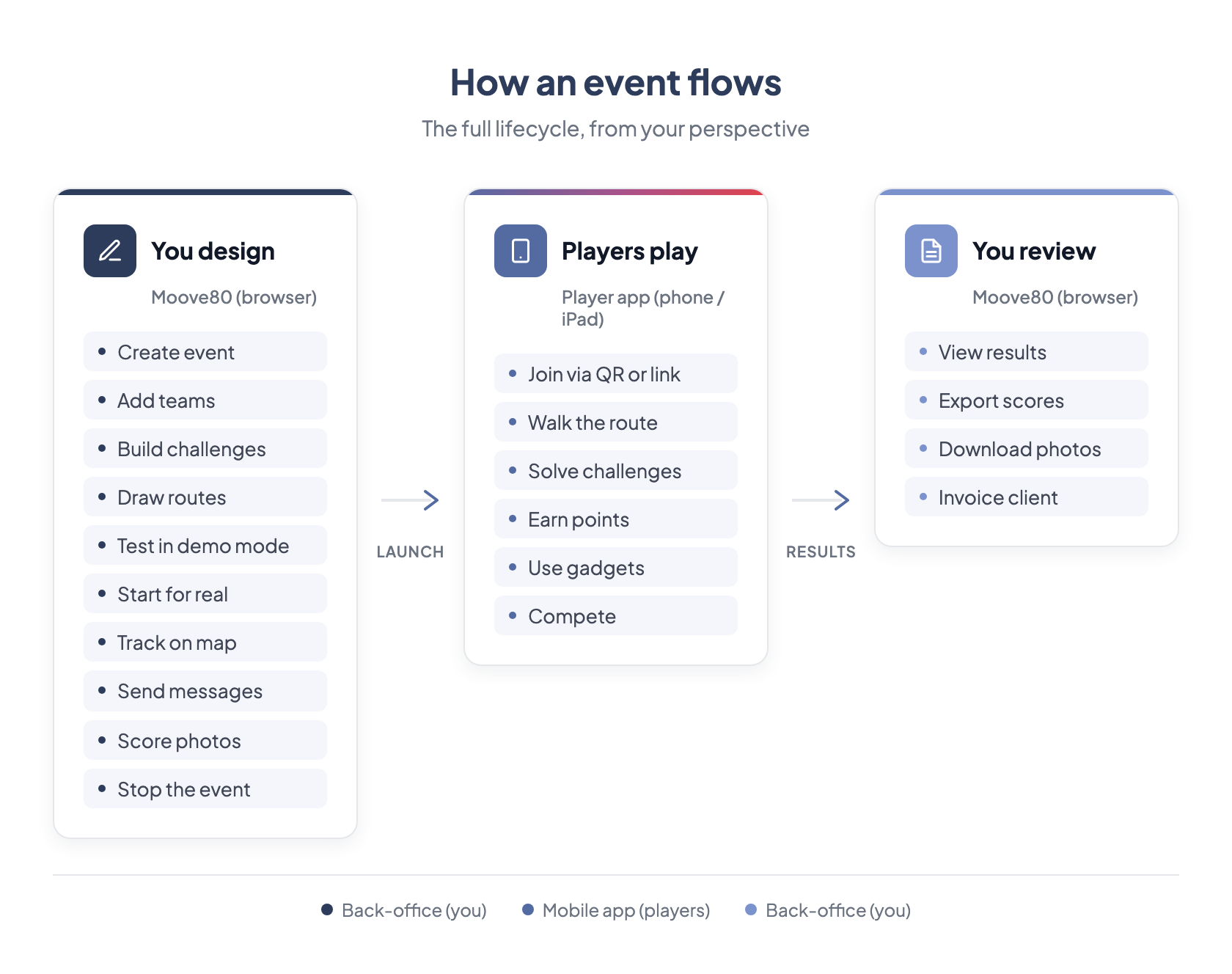
Everything on the left and right happens in MooveTeam CMS. Everything in the middle happens on the player’s device. You never need to touch the player app yourself (unless you want to test).
What participants see
Section titled “What participants see”When a player opens the app, they see:
- A map with icons marking challenge locations
- A list of challenges they can attempt
- A leaderboard showing team rankings
- A chat where teams can message each other
When they walk to a challenge location, the challenge activates automatically. They complete it — answer a question, take a photo, solve a puzzle — and earn points.
The player app
Section titled “The player app”MooveXR is the player app for MooveTeam — available for iOS and Android, managed from MooveTeam CMS.
| Product | What it is |
|---|---|
| MooveXR | GPS experiences with augmented reality, gadgets, and real-time chat. Supports indoor, outdoor, and hybrid events. The organizer is typically present to coordinate the activity. |
Credits — how pricing works
Section titled “Credits — how pricing works”Creating events is free. Testing them is free. You only pay when you run an event with real participants.
The currency is credits:
- 1 credit = 1 playing team per event
- A team of 5 people sharing one tablet = 1 credit
- In BYOD mode (each player on their own phone), each device counts as a team = 1 credit per device
- You purchase credits in advance, and they never expire
- Larger packs cost less per credit
Cost summary:
| Action | Cost |
|---|---|
| Create an event | Free |
| Edit and configure it | Free |
| Run it in demo mode | Free (limited to 3 teams) |
| Run it with real participants | 1 credit per playing team |
| Buy more credits | Volume pricing — ask your account manager |
This means you can build your entire event, test it thoroughly in demo mode, and only spend credits when the client is on-site.
User roles
Section titled “User roles”Not everyone sees the same MooveTeam CMS. What you can do depends on your role:
| Role | What you can do |
|---|---|
| Agency | Create and run events, manage teams and challenges, handle sales. This is what most users have. |
| Viewer | See events, teams, and results. Cannot create or change anything. Good for clients who want to observe. |
If you are reading this manual, you are most likely an Agency user. Everything in this manual is written for that role.
Languages
Section titled “Languages”MooveTeam CMS supports six languages for the back-office interface: English, Spanish, French, Dutch, Polish, and German. You can switch at any time from the login page or the top-right menu.
MooveXR supports 12 player languages: English, Catalan, Dutch, French, German, Italian, Polish, Portuguese, Simplified Chinese, Slovenian, Spanish, and Traditional Chinese. Participants play in their own language regardless of which language you use in the back-office.
Next: Key Concepts — the vocabulary you need before you start building.